Guides
Why Passport & Visa Photos Get Rejected — 10 Common Reasons (2026)
Key takeaways
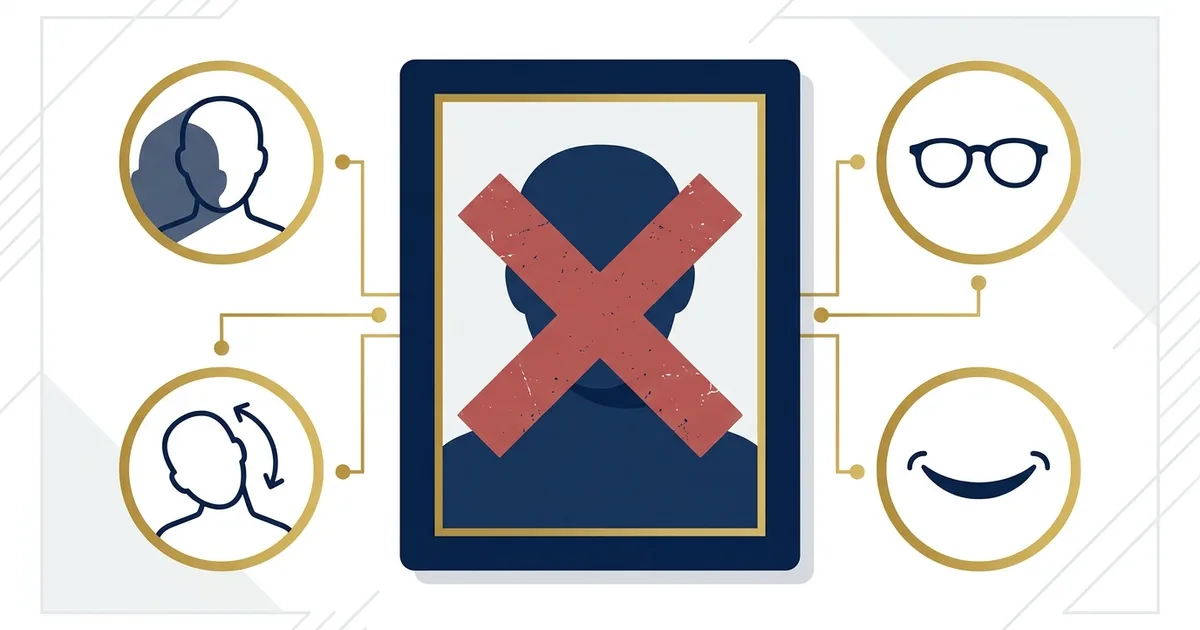
- The single most common reason is the wrong head size or position — your head must fill an exact share of the frame (about 50–69% for the US), sit centred and upright, and be neither too close nor too far.
- The background must be the exact colour your country asks for (plain white for the US; light grey for the UK) and completely even, with no shadow behind your head.
- Online and visa portals reject photos for the wrong pixel size, file format, or kilobyte range — and the digital aspect ratio often differs from the printed size.
- Glasses are banned in some countries (the US, India) but allowed without glare in others — the rule is country-specific, never universal.
- Beauty filters, background blur, and AI-generated faces are now detected and rejected — only framing, size, and background may be adjusted.
A rejected passport or visa photo is one of the most frustrating ways an application stalls — it costs you a fee, a reprint, and sometimes a missed appointment, almost always for a reason you could have spotted in advance. The reassuring part is that rejections aren't random: the overwhelming majority come from the same short list of fixable mistakes.
This guide breaks down exactly why passport and visa photos get rejected, what each reason looks like, and how to fix it before you submit. If you'd rather have the crop, head ratio, and background checked for you, you can upload a photo to OneSnapID and preview a compliant result for free first. Prefer to shoot it correctly from scratch? Start with our how to take a passport photo at home guide.
How common are passport photo rejections?
Photo problems are among the most common reasons passport and visa applications are delayed, and nearly all of them trace back to a handful of issues — background, lighting, head size, expression, glasses, and digital file limits. None of them are about photo quality or an expensive camera; they're about matching an exact spec.
Passport authorities check every photo against the international ICAO biometric standard, which is designed so that facial-recognition systems can read the image reliably. That's why seemingly small things — a faint shadow, a slightly oversized head, a reflection on glasses — cause a rejection: they interfere with the automated read, not just a human reviewer's judgement. Understanding the spec is the whole game, so let's go through what actually trips people up.
What are the most common reasons photos get rejected?
The most common reasons a passport or visa photo is rejected are: the wrong or uneven background, shadows, an incorrect head-size ratio, a non-neutral expression, eyes not clearly visible, glasses or glare, the wrong digital file size or format, edited or AI-altered images, an out-of-date photo, and obstructions in the frame.
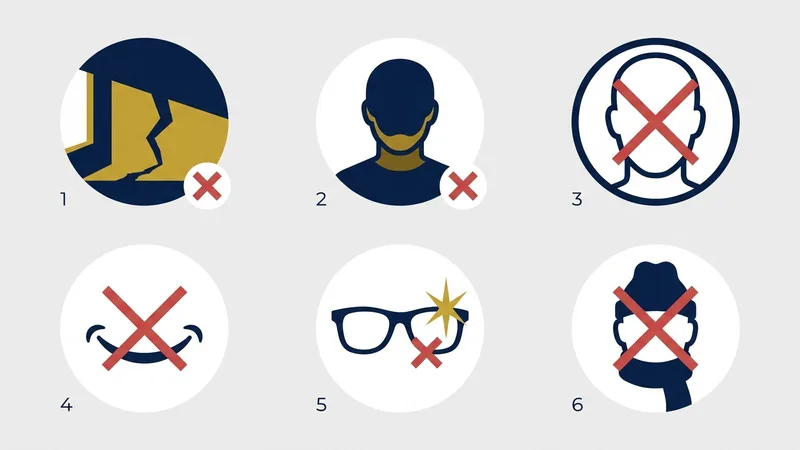
- Wrong head size or position. The single most common reason. The head fills too much or too little of the frame, sits off-centre, or is tilted. Each country sets an exact head-height ratio (about 50–69% for the US) that must be met.
- Wrong or uneven background. Using white where the country wants light grey (or the reverse), or a wall with a visible shadow, texture, or colour cast.
- Shadows on the face or wall. Overhead light or a flash throws shadows under the eyes, nose, and chin, or a hard shadow behind the head. Reviewers and automated checks both fail these.
- Non-neutral expression. Smiling with teeth, raised eyebrows, a frown, or an open mouth. Almost every authority requires a relaxed, neutral face with the mouth closed.
- Eyes not clearly visible. Closed or squinting eyes, hair across the eyes, red-eye, or a gaze that isn't straight into the lens.
- Glasses (or glare on them). Banned outright in some countries; elsewhere any reflection, tint, or frame covering the eyes fails the photo.
- Wrong file format, size, or resolution. Online portals enforce exact pixel dimensions, JPEG format, and kilobyte limits. The wrong export is silently rejected before a human sees it.
- Edited, filtered, or AI-altered photos. Beauty filters, skin smoothing, portrait-mode blur, and AI-generated faces are now detected and refused.
- Photo too old or appearance changed. Most countries want a photo from the last 6 months (the UK, within a month). A significantly changed appearance fails even a recent photo.
- Obstructions or other people in frame. Hats, headphones, a hand, a toy, a hair clip, or another person's shoulder in the shot. The frame must contain only your head and shoulders.
The sections below take the biggest culprits one at a time, with the specific fix for each. We start with the number-one cause — head size and position — then work through the rest. If you only remember one thing: get the head ratio right first, because it's the single most common reason photos come back.
What head size and position do authorities require? (The #1 reason)
The most common rejection reason is the wrong head size or position. Your head must fill a specific share of the frame and sit centred and upright. The US requires the head to be 50–69% of the photo height; most 35×45 mm countries want the head roughly 32–36 mm tall. Too zoomed in, too far away, tilted, or off-centre all cause rejection.
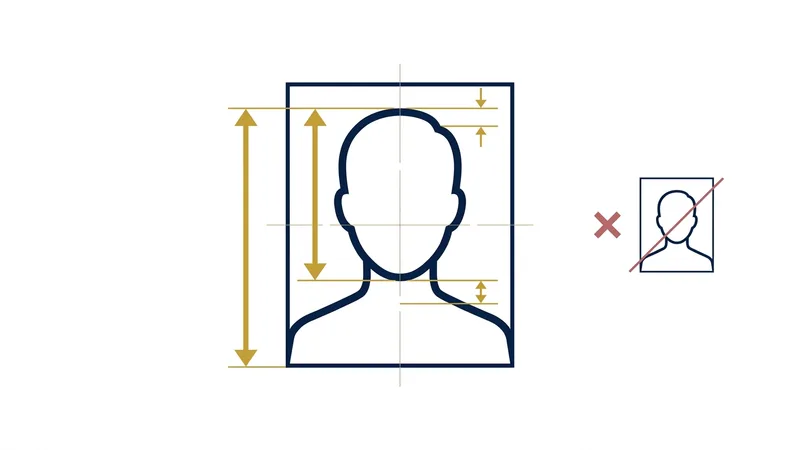
The head-height ratio is the rule most people get wrong because it isn't obvious by eye, and it's why studies of rejected photos put incorrect head size at the top of the list. A selfie taken at arm's length usually makes the head too large and distorts the face; standing too far back makes it too small. The head must also be straight — not tilted — and centred, with the eyes at the right height and a small, even margin above the hair. Because the tolerances are measured in millimetres, this is the hardest part to get right manually, and it's exactly what an automated cropper handles: OneSnapID detects your face and crops to your country's precise head ratio in seconds, so it can't be slightly off.
Why does the background cause so many rejections?
The background is rejected when it's the wrong colour for your country, uneven, or has a shadow behind the head. Most countries require plain white, but the UK wants light grey or cream and the Schengen area accepts light grey or off-white — using the wrong one fails the photo even if everything else is perfect.
Two background mistakes dominate. The first is colour: people shoot a UK passport photo against a white wall when the UK actually wants light grey, or submit an off-white shot for a US passport photothat requires plain white. The second is evenness — a wall that looks white to your eye often has a shadow on one side or a colour cast from a nearby lamp. To get a clean background, stand 1.5–2 metres in front of the wall so your own shadow falls to the floor rather than behind you, light the wall as evenly as your face, and wear a top that contrasts with it so your shoulders don't blend in. If a perfectly even wall isn't available, OneSnapID replaces and evens the background to your country's exact colour automatically.
How do shadows and bad lighting get photos rejected?
Shadows under the eyes, nose, and chin — or a hard shadow on the wall behind you — are a top rejection reason, almost always caused by overhead light or a flash. Soft, even, frontal daylight from a window removes them. Mixed warm and cool light that tints your skin unevenly can fail automated checks too.
Lighting causes rejections in two ways: shadows and colour. Overhead ceiling lights drop shadows into the eye sockets and under the nose and chin, while a direct flash flattens the face and throws a hard shadow onto the wall behind you. The fix is soft, diffused light: face a window on an overcast day, or sit at 45° to it, and add a white card or second window on the darker side to balance it. Keep the light colour consistent — mixing a warm bulb with cool daylight tints the skin unevenly, which some biometric checks flag. Before you commit to a frame, look specifically for a shadow line behind your head; that one is the easiest to miss and the most common to fail.
Why do expression, eyes, and mouth matter so much?
Almost every country requires a neutral expression with the mouth closed and both eyes open, looking straight at the camera. Smiling with teeth, raised eyebrows, squinting, closed eyes, or hair across the eyes will get the photo rejected because they interfere with facial recognition.
Biometric systems map the distances between fixed facial features, so anything that changes them — a broad smile, a frown, raised brows — can fail the match. Keep a relaxed, natural face with your lips together. Both eyes must be fully open and clearly visible, so push hair off your face and avoid heavy fringes that fall over the eyes. Look directly into the lens, not slightly up or to the side. For very young children the expression rule is relaxed, but for everyone else a true neutral face is the safe choice.
Do glasses and head coverings get photos rejected?
Glasses are banned in the US (since November 2016) and India (since 2025), and any glare, tint, or frame covering the eyes fails the photo where they're still allowed. Head coverings are only accepted for religious or medical reasons, and even then the full face from the bottom of the chin to the top of the forehead must be visible.
The glasses rule trips people up because it isn't universal. The US State Department banned eyeglasses in 2016 after glare and frames caused identification problems, and India tightened its rule in 2025. Where glasses are still permitted — for a Schengen visa photo or a Canada passport photo — the lenses must be clear, the frames must not cover the eyes, and there must be zero reflection, which is hard to guarantee at home. Hats and head coverings are not allowed except for religious or medical reasons, and the face must remain fully visible with no shadow cast by the covering. When in doubt, remove anything optional from your head before shooting.
How do rejection rules differ by country?
Many rejections happen because people apply one country's rule to another. The four rules that change the most between countries are glasses, background colour, head-size ratio, and the digital file format — what passes for a US passport photo can fail a UK, Schengen, Indian, or Japanese application. There is no single universal rule, so always check your specific country.
- Glasses — never assume “no glasses” everywhere. The US (since 2016) and India ban them outright; the UK advises removing them; the Schengen area, Canada, and Japan allow them only with no glare and frames clear of the eyes.
- Background colour. Plain white for the US, India, and Japan; light grey or cream for the UK; light grey or off-white for the Schengen area. A white wall that passes for the US fails a UK photo.
- Head-size ratio.The US wants the head at 50–69% of the photo height; most 35×45 mm countries (UK, Schengen, India, Japan) want it larger — roughly 70–80%, or 32–36 mm tall. The same crop can be “too small” in one country and correct in another.
- Digital format.India's e-Visa / VFS upload is a square JPEG within a tight KB band; Japan's online passport photois 600×730 px (a different aspect ratio from the printed 35×45 mm); the US DS-160 is a 600–1200 px square. Matching the printed size but not the portal's digital spec still fails.
This is exactly why generic advice — and tools tuned only to the US 2×2 — gets photos rejected abroad. OneSnapID keeps each of 60+ countries' current spec built in, so the crop, background colour, head ratio, and digital file all match the country you actually pick.
Why do online and digital applications reject photos (and how do you fix it)?
Online and visa portals check the file itself before any human sees it, so a photo that looks perfect can still bounce. Three things fail uploads: the face doesn't meet the ICAO head-size ratio, the digital dimensions differ from the printed size, or the file is the wrong format or kilobyte range. The fix isn't a studio — it's matching the portal's exact digital spec.
The most common trap is assuming the digital photo is just the printed one scanned. It often isn't. Japan's online passport application (via Maina Portal) wants a JPEG of exactly 600×730 px under 600 KB — and the official guidance specifically warns that this aspect ratio is different from the printed 35×45 mm photo, so a correctly-sized print exported as-is is rejected. India's e-Visa and VFS uploads want a square JPEG inside a narrow KB band, while the US DS-160wants a 600–1200 px square under a set size. Re-compressing a photo until it's blurry, or exporting at the print aspect ratio, are the two failures we see most.
Underneath every portal is the same ICAO biometric standard: the face has to fill the right proportion of the frame and be centred and level, or the automated check fails before a person ever looks. So the fix for a silently-rejected upload is twofold — get the head ratio right, then export to the portal's exact pixel size, aspect, format, and kilobyte limit. That precise digital export is what OneSnapID produces for each document, so the file matches the portal the first time.
Are edited, filtered, or AI-generated photos rejected?
Yes. Beauty filters, skin smoothing, portrait-mode background blur, and AI-generated or “enhanced” faces are now detected and rejected by authorities such as the US State Department. Only framing, size, and background may be adjusted — never your facial features.
As phone cameras and apps add automatic “beautification,” this has become a fast-growing rejection reason. Portrait mode blurs the background artificially, beauty modes smooth skin and reshape features, and AI photo tools invent details that don't match a real biometric face — all of which fail modern checks. The line is simple: you may correct framing, crop to the right size, and clean or replace the background, but you may not alter the face. This is exactly why OneSnapID only adjusts geometry and background and never touches your features, so the result stays acceptable. Turn off portrait and beauty modes before you shoot, too.
What extra reasons get visa photos rejected (vs passport)?
Visa photos follow the same facial rules as passport photos but add portal-specific digital constraints: a stricter file-size range, an exact square pixel size, a tighter recency window, and sometimes a different background or size from the same country's passport. A photo that passed as a print can fail a visa upload purely on file dimensions.
The biggest difference is that visa applications are usually digital uploads, so the file rules matter more. The DS-160 for a US visa, for instance, is the same 2×2 in face spec as the US passport photo but is submitted as a square JPEG with its own pixel and size limits. Some countries also use a different size for visas than passports — Saudi Arabia's visa photo is 51×51 mm while its passport photo is 40×60 mm. And many visa portals want a very recent photo and a strictly plain background. The fix is to match the exact document, not just the country: pick the visa page for your destination so the size, background, and file limits are correct from the start.
How can I make sure my photo won't be rejected?
Before you submit, run through a short checklist: confirm the exact size and head ratio, check the background colour and evenness, look for shadows, verify a neutral expression and open eyes, remove glasses, match the digital file limits, and make sure nothing is edited or obstructing the frame.
- 1
Confirm your country's exact size and head ratio
Look up the precise photo size (e.g. 2×2 in for the US, 35×45 mm for the UK) and the required head-height percentage, then crop to match it exactly — not approximately.
- 2
Check the background colour and evenness
Make sure the background is the exact colour your country requires (plain white for the US, light grey for the UK) and is completely even, with no shadow, gradient, or object behind your head.
- 3
Look for shadows on your face
Inspect under the eyes, nose, and chin. Any shadow means the lighting was uneven — re-shoot facing soft window light before submitting.
- 4
Verify your expression and eyes
Neutral face, mouth closed, both eyes fully open and looking straight at the camera. No smile that shows teeth and no squinting.
- 5
Remove glasses and check for glare
Where glasses are banned (the US, India), take them off. Where they're allowed, confirm there is zero reflection and the frames don't cover your eyes.
- 6
Match the digital file requirements
For online uploads, export as JPEG at the portal's exact pixel size and within its kilobyte range. Re-saving at the wrong dimensions is a common silent rejection.
- 7
Make sure nothing is edited or obstructed
No filters, beautification, or AI edits, and nothing in the frame but your head and shoulders — no hats, headphones, hair across the eyes, or other people.
Check your photo before you submit
Upload a photo, preview a compliant result for free. $5.99 only if you download.
Try the free previewThe bottom line
Passport and visa photos are rejected for a short, predictable list of reasons — most often the wrong head size or position, then the wrong or uneven background, shadows, a non-neutral expression, glasses, the wrong digital file, and edits to the face. Every one of them is avoidable once you know to look for it.
The hardest reasons to catch by eye are the precise ones: the head-height ratio measured in millimetres and the file dimensions an online portal silently enforces. Those are exactly what a tool can verify in seconds. If you'd rather not measure pixels, upload your photo and preview a compliant result for free — or, to shoot it right the first time, read how to take a passport photo at home. Have a document in mind? Go straight to the US passport photo, US visa (DS-160) photo, or UK passport photo page.
Don't risk a rejection
OneSnapID fixes every reason above automatically — the exact head ratio and crop, the right background colour, and a portal-ready digital file for your country. Preview it free and pay $5.99 only if you download. And if your photo is ever rejected, you get a 100% refund.
Check my photo free100% refund if rejected · Free preview · Your photos stay private
Frequently asked questions
Why was my passport photo rejected?
The most common reasons are the wrong or uneven background colour, shadows on the face or wall, an incorrect head-size ratio, a non-neutral expression, or wearing glasses where they're banned. For online applications, the wrong file size, pixel dimensions, or format is an equally frequent (and silent) cause.
Why was my visa photo rejected but my passport photo accepted?
Visa portals often add their own digital rules on top of the standard photo spec — a tighter kilobyte range, an exact square pixel size, or a stricter recency window. A photo that passed as a printed passport photo can fail a visa upload purely on file dimensions or compression, even though the face and framing are identical.
Does a plain white wall count as a white background?
Often, but not always. Walls are rarely a pure, even white once light hits them — they pick up shadows, warm or cool colour casts, and texture. For countries that require plain white (like the US), the background must read as clean white with no shadow behind the head; the UK actually wants light grey, so a white wall fails there.
Will glasses get my passport photo rejected?
In the US (since November 2016) and India (since 2025), yes — glasses are banned outright. Where they're still allowed, such as the Schengen area or Canada, any glare on the lenses, tinted lenses, or frames covering the eyes will fail the photo. Because a single reflection means rejection, taking glasses off is the safe choice almost everywhere.
Can shadows really get a photo rejected?
Yes — shadows are one of the top rejection reasons. A shadow under the eyes, nose, or chin from overhead light, or a hard shadow on the wall behind your head, fails both human and automated checks. Soft, even, frontal light from a window removes them.
Why does my head size keep getting the photo rejected?
Each country specifies the share of the frame your head must fill — for example 50–69% of the height for the US. If you stand too close the head is too big; too far and it's too small. Tilting or sitting off-centre fails too. Cropping to the exact head-height ratio fixes it.
Why do online passport photo uploads keep getting rejected?
Digital portals check the file before a person does. A photo that isn't a JPEG, is below the minimum pixel size, exceeds the maximum dimensions, or falls outside the allowed kilobyte range is auto-rejected. India's e-Visa, for instance, enforces a tight file-size band. Exporting to the portal's exact stated limits is essential.
Are AI-enhanced or beautified photos rejected?
Yes. Authorities such as the US State Department now detect and reject digitally altered or AI-generated faces, as well as beauty filters, skin smoothing, and portrait-mode background blur. Only framing, size, and background may be adjusted — never your facial features.
Can I just edit and re-submit a rejected photo?
Sometimes. If the rejection was for a technical reason — wrong size, slightly off crop, or a file-format issue — re-exporting correctly can fix it. But if the problem was the shot itself (shadows, glasses glare, a non-neutral expression, or bad lighting), no amount of editing will pass, and editing the face risks an 'altered photo' rejection. In those cases, re-shoot.
Do passport photos get rejected for smiling?
Yes, in most countries. A neutral expression with the mouth closed is required. A relaxed, natural face is fine, but a smile that shows teeth or noticeably changes your eyes will usually be sent back.
How do I know if my photo will be accepted before I submit it?
You can check it against your country's spec first. OneSnapID lets you upload a photo and preview a compliant result for free — it crops to the exact size and head ratio, evens out the background, and flags issues like expression or glasses before you pay $5.99 for the final download.
How many times can a passport photo be rejected?
There's no fixed limit — you can keep resubmitting until the photo meets the requirements — but each rejection delays your application and, in person, can mean another trip. Getting it right the first time is the only real way to avoid the delay, which is why a pre-submission check is worth the few minutes.